AtmaGo Community Public Action Form
Now you can invite people to join actions through a public form. Simply request a special link from the admin, share it, and everyone can fill it easily. Every submission is safe because it must be approved by the admin before being published.
Start from Your Community
The Convenience You Get
-
Special Link from Admin
Each community has a unique link shared directly by the admin.
-
Easy for Members
Anyone with the link can fill in the form without hassle.
-
Safe & Reliable
All entries go to the admin first. Once approved, they will be published.
How the AtmaGo Community Action Public Form Works
-
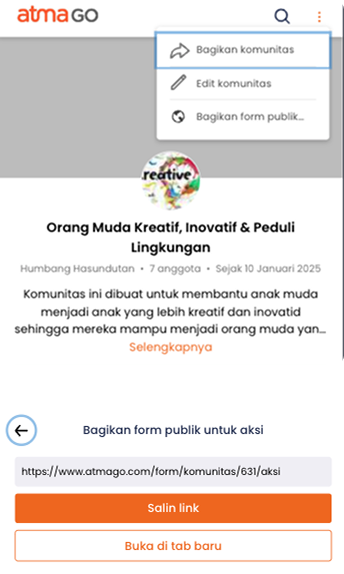
Step 1
Get Form Link from Community
Go to your community page on AtmaGo as an admin, select the three-dot menu, and click "Share public form". From here you can copy the link to share with members.
-
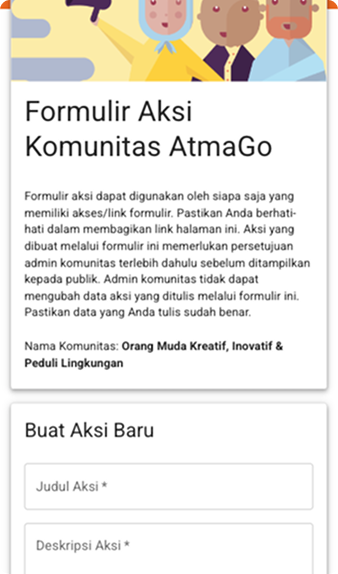
Step 2
Open the Community Action Form
Click the link shared by the admin. You will see the action form page with community info and fields to fill in.
-
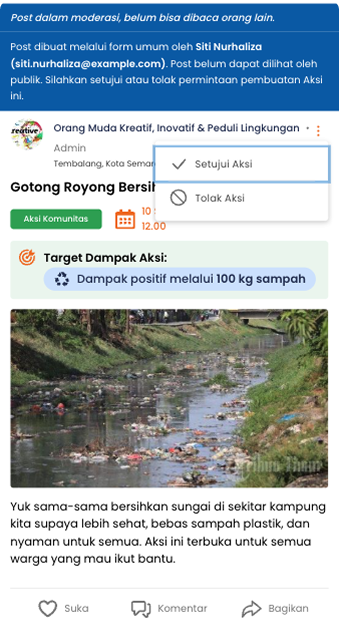
Step 3
Submit Action & Wait for Approval
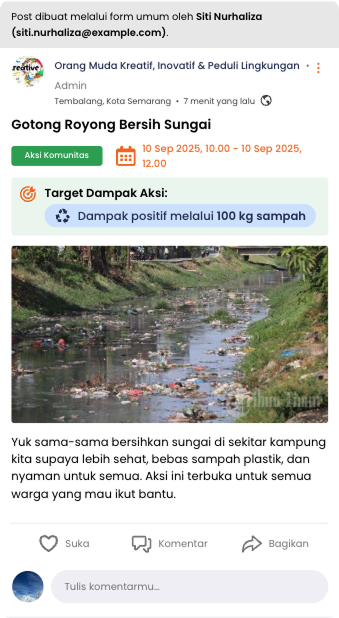
After filling the form, your action will appear in moderation status. The community admin will check before it is officially published.
-
Step 4
Action Published
Once approved, the action will appear on the community page. Members can see details, support, comment, or join the action.
Frequently Asked Questions
How to get the form link?
Can everyone fill in the form?
Will the form results appear immediately?
Can the form be reused?
Can the admin see all entries?
Can the admin reject entries?
Invite members to join actions in an easy, safe, and transparent way.
Start from Your Community